Free-NTFS-for-Mac
Nigate
| Language / 言語 / 语言: English | 日本語 | 简体中文 |
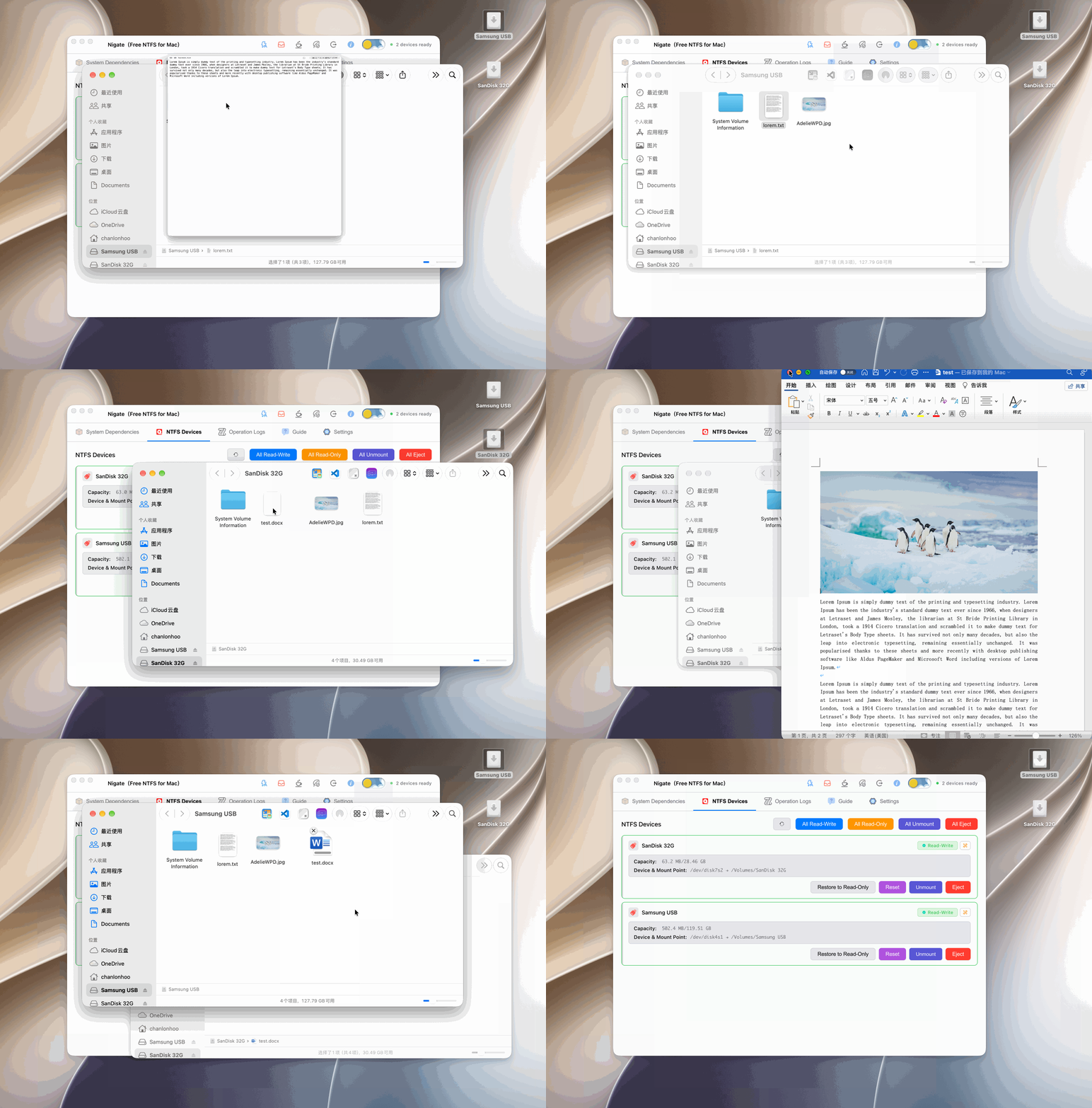
This is the Electron GUI version of Nigate, which provides a modern and intuitive interface for NTFS device management while retaining the original geek terminal version.1
Features
- 🎨 Modern Interface - Dark theme with clean and beautiful design
- 📱 Real-time Monitoring - Automatically detects NTFS device connections
- ✅ Dependency Check - Automatically checks and installs required system dependencies
- 🔄 One-Click Mount - Easily mount read-only NTFS devices in read-write mode
- ⚡ Auto Read-Write - When enabled, newly inserted NTFS devices will be automatically mounted in read-write mode without manual operation. Intelligently skips devices you manually set to read-only, respecting your choices
- 📊 Status Display - Clearly displays device status and operation logs
- 🛡️ Secure & Reliable - Uses Electron security best practices and provides a non-destructive disk repair Reset button
- ☕ Prevent Sleep - One-click toggle to prevent system sleep, ensuring the system stays awake during long operations
- 🍃 Status Protection - Long press for 3s to toggle protection status. When protected, auto read-write, tray mode, and prevent sleep features will be disabled to prevent accidental operations
- 🥷 Ninja Tools - Provide cross-filesystem mounting and end-to-end scripts from development to release, with one-click permission fixes and multi-language output to simplify complex operations and lower the usage barrier
- 💻 Apple Silicon Support - Built for Apple Silicon Macs (arm64)
Important Notes
[!CAUTION] The stable operation and data integrity of this software depend on the performance of storage devices. To avoid data read/write errors, transfer interruptions, or device recognition failures, it is recommended to use USB drives made with high-quality flash memory chips that have reliable read/write performance.
[!important] Read-Write Notes:
- Basic Operations: Supports file copy, cut, delete, and rename (metadata-level operations)
- Editing and Saving: The GUI mounts NTFS volumes read-write with file ownership mapped to the current macOS user (
uid/gid). Text and image editing and saving work in tested configurations, but compatibility may vary by editor and save operation- If Saving Fails: Keep a backup of important data. As a workaround, copy the file to your Mac, edit it locally, then copy it back. Editors that save through a temporary file and rename may help in some cases, but are not guaranteed to bypass every limitation
- Additional Note: Ninja Tools
/ninja/kamui.shsupports direct in-place data modification on original files, suitable for scenarios requiring direct file editing 2
- Administrator Privileges: Mounting operations require administrator privileges, and the system will prompt for a password
- Windows Fast Startup: If the device uses Fast Startup in Windows, mounting may fail. It is recommended to fully shut down (not hibernate) in Windows, or disable Fast Startup
- Device Name: USB drive names do not support spaces or illegal characters
- Gatekeeper (Allow Anywhere): First-time use may require disabling Gatekeeper to allow unsigned applications. Run in terminal:
sudo spctl --master-disable. After disabling, you can see the “Anywhere” option in “System Settings” > “Privacy & Security” - System Integrity Protection (SIP) (Optional): To disable SIP, you need to operate in Recovery Mode:
- Restart Mac, hold the power button until the Apple logo and progress bar appear, enter Recovery Mode
- Find and open Terminal from the toolbar at the top of the screen, enter command:
csrutil disable - Close Terminal and restart Mac
- After restart, you can run
csrutil statusin terminal to check the status
- Bootable USB Drives: If a USB drive has been used to create bootable media like Ventoy or WePE, it may take some time when mounting it in read-write mode
Quick Start
Method 1: Online Experience (Shell - Ninja Tools)
The following scripts are from the ninja/ folder’s Ninja Tools collection, providing command-line support for NTFS and Linux filesystem read-write access.
🌍 All scripts support multiple languages! Use LANG=ja or LANG=zh to set the language.
NTFS Read-Write Support
Copy and paste into a terminal with full administrative privileges and press Enter:
# English (default)
/bin/bash -c \"$(curl -fsSL https://cdn.statically.io/gh/hoochanlon/Free-NTFS-for-Mac/main/ninja/nigate.sh)\"

# Japanese
LANG=ja /bin/bash -c \"$(curl -fsSL https://cdn.statically.io/gh/hoochanlon/Free-NTFS-for-Mac/main/ninja/nigate.sh)\"

# Chinese
LANG=zh /bin/bash -c \"$(curl -fsSL https://cdn.statically.io/gh/hoochanlon/Free-NTFS-for-Mac/main/ninja/nigate.sh)\"
Linux ext4 and Other Filesystem Read-Write Support
Supports ext2/3/4, btrfs, xfs, zfs, NTFS, exFAT, LUKS encryption, LVM, RAID, and many other filesystems:
# English (default)
/bin/bash -c \"$(curl -fsSL https://cdn.statically.io/gh/hoochanlon/Free-NTFS-for-Mac/main/ninja/kamui.sh)\"

# Japanese
LANG=ja /bin/bash -c \"$(curl -fsSL https://cdn.statically.io/gh/hoochanlon/Free-NTFS-for-Mac/main/ninja/kamui.sh)\"

# Chinese
LANG=zh /bin/bash -c \"$(curl -fsSL https://cdn.statically.io/gh/hoochanlon/Free-NTFS-for-Mac/main/ninja/kamui.sh)\"
Method 2: Download Locally (Shell - Ninja Tools)
After downloading, you can directly type nigate to start:
curl https://fastly.jsdelivr.net/gh/hoochanlon/Free-NTFS-for-Mac/ninja/nigate.sh > ~/Public/nigate.sh && sudo -S mkdir -p /usr/local/bin && cd /usr/local/bin && sudo ln -s ~/Public/nigate.sh nigate.shortcut && echo \"alias nigate='bash nigate.shortcut'\" >> ~/.zshrc && osascript -e 'tell application \"Terminal\" to do script \"nigate\"'
Method 3: GUI Version (Electron)
Download and use from tags.
- 🌍 Application interface supports multiple languages: Chinese (Simplified/Traditional), Japanese, English, German, and more
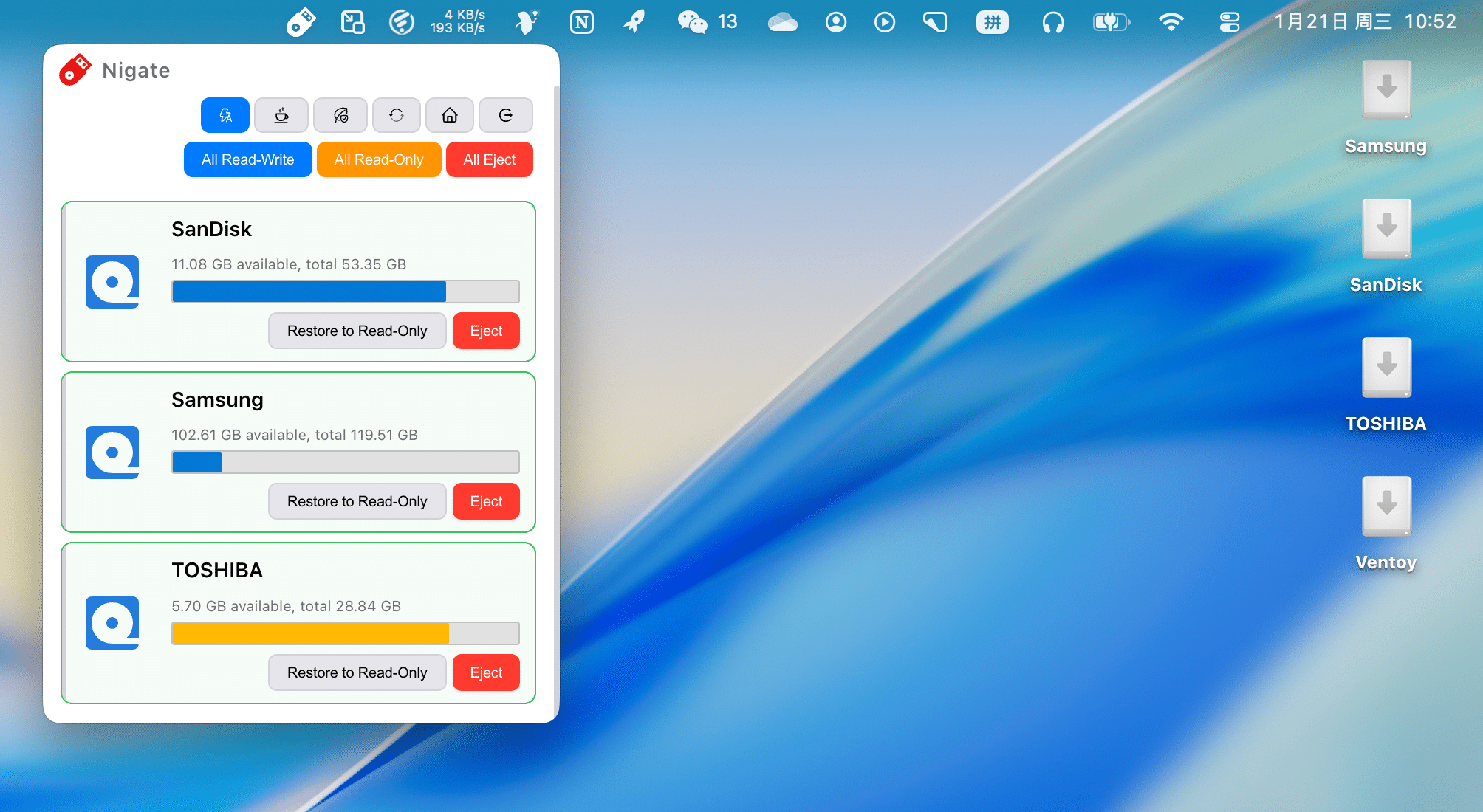
Tray
Dependency Management
One-Click Install Dependencies
# English (default)
/bin/bash -c \"$(curl -fsSL https://cdn.jsdelivr.net/gh/hoochanlon/Free-NTFS-for-Mac@main/ninja/kunai.sh)\"

# Japanese
LANG=ja /bin/bash -c \"$(curl -fsSL https://cdn.jsdelivr.net/gh/hoochanlon/Free-NTFS-for-Mac@main/ninja/kunai.sh)\"

# Chinese
LANG=zh /bin/bash -c \"$(curl -fsSL https://cdn.jsdelivr.net/gh/hoochanlon/Free-NTFS-for-Mac@main/ninja/kunai.sh)\"
One-Click Uninstall Dependencies
# English (default)
/bin/bash -c \"$(curl -fsSL https://cdn.jsdelivr.net/gh/hoochanlon/Free-NTFS-for-Mac@main/ninja/ninpo.sh)\"

# Japanese
LANG=ja /bin/bash -c \"$(curl -fsSL https://cdn.jsdelivr.net/gh/hoochanlon/Free-NTFS-for-Mac@main/ninja/ninpo.sh)\"

# Chinese
LANG=zh /bin/bash -c \"$(curl -fsSL https://cdn.jsdelivr.net/gh/hoochanlon/Free-NTFS-for-Mac@main/ninja/ninpo.sh)\"
System Permission Settings
Configure system permissions and security settings (Gatekeeper, SIP, etc.):
# English (default)
/bin/bash -c \"$(curl -fsSL https://cdn.jsdelivr.net/gh/hoochanlon/Free-NTFS-for-Mac@main/ninja/shuriken.sh)\"

# Japanese
LANG=ja /bin/bash -c \"$(curl -fsSL https://cdn.jsdelivr.net/gh/hoochanlon/Free-NTFS-for-Mac@main/ninja/shuriken.sh)\"

# Chinese
LANG=zh /bin/bash -c \"$(curl -fsSL https://cdn.jsdelivr.net/gh/hoochanlon/Free-NTFS-for-Mac@main/ninja/shuriken.sh)\"
For more information, see: Ninja Tools Testing #39 and Ninja Tools Documentation
Operations & Development
🚀 One-Click Run (Recommended for Beginners)
Users without any development environment can deploy in one step!
The project provides intelligent one-click run scripts that automatically detect and install all necessary tools (Node.js, pnpm, dependencies, etc.), then automatically compile and start the application.
Method 1: Use One-Click Script in Project Root (Recommended)
# Clone project
git clone <repository-url>
cd Free-NTFS-for-Mac

# One-click run (auto-install environment, compile, start)
./dev.sh
Or use the script in the ninja directory:
./ninja/izanaki.sh
The script automatically completes:
- ✅ Detects and installs Node.js (if not present)
- ✅ Detects and installs pnpm (if not present)
- ✅ Syncs version numbers
- ✅ Installs project dependencies
- ✅ Compiles TypeScript code
- ✅ Compiles Stylus styles
- ✅ Starts application (development mode)
Method 2: Manual Installation (For Experienced Developers)
- Clone and Initialize
git clone <repository-url>
cd Free-NTFS-for-Mac
pnpm install
- Run Application
# Production mode
pnpm start

# Development mode (automatically opens DevTools)
pnpm run dev
- Build Application
pnpm run build
🌍 Multi-Language Support
All scripts and tools support multiple languages, can be set via LANG environment variable:
# English (default)
./dev.sh

# Japanese
LANG=ja ./dev.sh

# Chinese
LANG=zh ./dev.sh
Supported scripts include:
dev.sh/ninja/izanaki.sh- One-click run scriptninja/kamui.sh- Linux filesystem mountninja/nigate.sh- NTFS auto mountninja/build.sh- Application packagingninja/shuriken.sh- System permission settings- And all other ninja tools collection scripts
Project Setup Script
If you encounter errors with pnpm run dev, run the setup script to fix them:
pnpm run setup
Or run directly:
./ninja/izanaki.sh
This script automatically:
- ✅ Checks if required files exist
- ✅ Sets script execution permissions
- ✅ Creates necessary directory structure
- ✅ Syncs version numbers
- ✅ Compiles TypeScript and Stylus
- ✅ Verifies critical files
After building, you can find the packaged application in the dist directory.
Mac Packaging Instructions
After packaging, the following will be generated in the dist directory:
- DMG File: Installation package for distribution
- ZIP File: Compressed application package
Other notes:
- Use
./ninja/build.shscript for more flexible packaging - First run may require right-clicking the application and selecting "Open" (macOS security restrictions)
Troubleshooting
Mount Failure
- Check if all dependencies are installed
- Confirm the device is not occupied by other programs
- If it’s a Windows Fast Startup issue, fully shut down the device in Windows
Dependency Installation Failure
- Ensure network connection is normal
- Check if Homebrew is correctly installed
- May need to manually run installation commands in terminal
Application Won’t Start
- Check if Node.js version meets requirements
- Delete
node_modulesand rerunpnpm install - Check console error messages
Acknowledgments
Thank you to all developers, testers, and users who have contributed to this project! See ACKNOWLEDGMENTS.md for details.
-
Note: Using this tool to mount or modify NTFS devices carries a risk of data loss. It is strongly recommended to backup important data before operation. This tool is provided "as is" without any warranty. The developer is not responsible for data loss caused by using this tool. ↩
-
Powered by nohajc/anylinuxfs with secondary encapsulation ↩