Windows基线检查脚本
花了一周的时间,写了个Windows基线检查的脚本,方便现场排查与故障信息分析。基线脚本涉及到的内容非常多,精力有限在发稿帖内一时半会说不完,尽可能补充图例,这样显得更具体一点。报表生成的起因是有人在 al0ne/LinuxCheck Linux基线脚本项目里提及“【建议】能否增加报告导出功能?”:https://github.com/al0ne/LinuxCheck/issues/13
适用人群:桌面运维工程师、小微企业网络工程师、行政后勤IT安全员、人资信息专员、计算机爱好者等。
使用
使用方法:
一、打开Powershell Set-ExecutionPolicy RemoteSigned
二、复制到你的powershell
irm https://ghproxy.com/https://raw.githubusercontent.com/hoochanlon/ihs-simple/main/d-pwsh/frontline_helpdesk.ps1|iex
三、注意:首次执行 [8] 项需要联网加载 import-excel 模块。
- 功能一 检查IP网络
- 功能二 打印机与扫描仪
- 功能三 检查硬盘、CPU、内存、显卡驱动等等
- 功能四 检查设备安全性、近期升级补丁、定时任务项
- 功能五 检查主机主动共享协议相关信息
- 功能六 检查电脑休眠、重启频次、异常关机、程序崩溃等信息
生成报表查阅图例
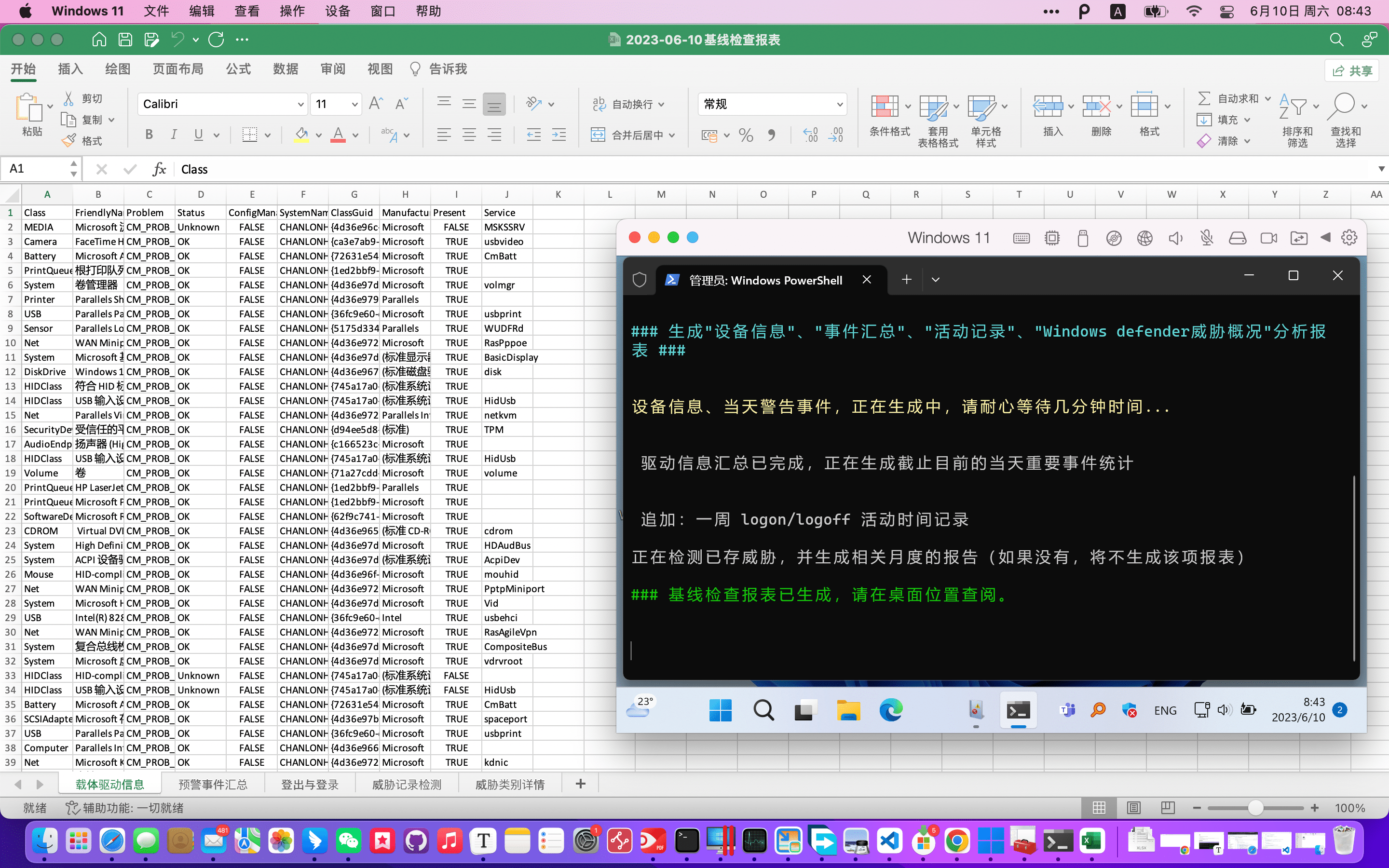
一、设备驱动信息 二、““警告”、错误”、“关键”事件汇总 三、活动记录 四、威胁记录检测 五、威胁类别详情
注:最后会略有调整,从当天调整到3天内,并排除如下events ID:
- 134, 1014, 8233, 10010, 10016
- 4648, 4634, 4199, 6013, 4803, 4802, 4800, 4801
三天内是为了获取之前征兆,关于events id 可查阅:
https://github.com/hoochanlon/scripts/blob/main/BITRH/Win10_Events_ID_useful.xlsx
源码部分
附源码:https://github.com/hoochanlon/scripts/blob/main/d-pwsh/frontline_helpdesk.ps1
# 检查主机名、系统安装日期、启动时间、运行时间、系统架构
function check_sys {

    Clear-Host
    Write-Host "`n"
    Write-Host "### 主机基础信息 ###" -ForegroundColor Cyan

    Get-ComputerInfo | Select-Object -Property `
        OsRegisteredUser, CsDomain, CsDNSHostName, OsName,
    OsInstallDate, OsLastBootUpTime, OsUptime, OsArchitecture `
    | Out-Host
}

# 检查IP与网络设备连接状态
function check_ip {

    Write-Host " "
    Write-Host "### 检查网络基本连接情况 ###`n" -ForegroundColor Cyan

    Write-Host "--- 检查IP地址 ---"  -ForegroundColor Yellow
    netsh interface ipv4 show addresses "以太网"
    netsh interface ipv4 show dnsservers "以太网"
    netsh winhttp show proxy

    Write-Host "--- 检查连接局域网网络状态 ---`n"  -ForegroundColor Yellow
    $result = Get-NetConnectionProfile | Select-Object -Property Name, InterfaceAlias, NetworkCategory
    if ($result) {
        $result | Out-Host
    }
    else {
        Write-Host "此网络存在异常。`n" -ForegroundColor DarkRed
    }

    Write-Host "--- 检查近期是否存在IP冲突 ---`n"  -ForegroundColor Yellow

    $result = Get-WinEvent -FilterHashtable @{
        LogName   = 'System'
        StartTime = (Get-Date).Date.AddDays(-14)
    } | Where-Object {
        ($_.Id -in 4199)
    } | Select-Object Id, Level, ProviderName, LogName, `
        TimeCreated, LevelDisplayName, TaskDisplayName

    if ($result) {
        $result | Out-Host
    }
    else {
        Write-Host "主机近期没有存在IP冲突事件。`n" -ForegroundColor Green
    }

    Write-Host "### 检查网络基本连接情况,已完成`n" -ForegroundColor Green
}

# 检查打印机状态详情
function check_printer {

    Write-Host " "
    Write-Host "### 检检查打印机状态 ###`n" -ForegroundColor Cyan

    Write-Host "--- 检查打印机服务,以及连接打印机数量 ---"  -ForegroundColor Yellow
    Get-Service | findstr "Spooler" | Out-Host

    Write-Host "--- 检查打印池是否有文件 ---"  -ForegroundColor Yellow
    Get-ChildItem C:\Windows\System32\spool\PRINTERS

    $result = Get-Printer | Select-Object Name, PrinterStatus
    if ($result) {
        $result | Out-Host
    }
    else {
        Write-Host "没有配置任何虚拟或实体打印机" -ForegroundColor DarkRed
    }

    Write-Host "--- 检查是否存在默认打印机 ---"  -ForegroundColor Yellow

    $result = Get-CimInstance -Class Win32_Printer | Where-Object { $_.Default -eq $true } | Select-Object Name
    if ($result) {
        $result | Out-Host
    }
    else {
        Write-Host "没有配置默认打印机" -ForegroundColor Magenta
    }

    Write-Host "--- 检查是否存在扫描仪服务 ---"  -ForegroundColor Yellow

    $result = Get-Service stisvc
    if ($result) {
        $result | Out-Host
    }
    else {
        Write-Host "扫描仪服务缺失" -ForegroundColor Magenta
    }

    Write-Host "`n### 检查打印机状态,已完成`n" -ForegroundColor Green
}

# 检查硬盘、CPU、内存信息
function check_disk_cpu_mem {

    # [math]::Round 用于调用 .NET Framework 中的静态方法或属性。
    # https://learn.microsoft.com/zh-cn/powershell/module/microsoft.powershell.core/about/about_arithmetic_operators?view=powershell-7.3

    Write-Host " "
    Write-Host "### 开始检查硬盘、CPU、内存、系统基础驱动 ###`n"  -ForegroundColor Cyan

    Write-Host "--- 检查硬盘类型与容量 ---"  -ForegroundColor Yellow
    $result = Get-PhysicalDisk
    if ($result) {
        $result | Out-Host
    }
    else {
        Write-Host "获取不到硬盘类型与容量`n"  -ForegroundColor Red
    }

    Write-Host "--- 检查硬盘分区及可用空间 ---"  -ForegroundColor Yellow
    $result = Get-Volume
    if ($result) {
        $result | Out-Host
    }
    else {
        Write-Host "获取不到硬盘分区及可用空间`n"  -ForegroundColor Red
    }

    Write-Host "--- 检查CPU参数 ---"  -ForegroundColor Yellow
    $result = Get-CimInstance -Class Win32_Processor | Select-Object Caption, MaxClockSpeed
    if ($result) {
        $result | Out-Host
    }
    else {
        Write-Host "获取不到CPU参数`n"  -ForegroundColor Red
    }

    Write-Host "--- 检查内存条参数、类型 ---`n"  -ForegroundColor Yellow
    Write-Host "DDR1: 400 MHz以下;DDR2: 800 MHz以下;DDR3: 2133 MHz以下;DDR4: 3200 MHz以下。"

    $result = Get-CimInstance -Class Win32_PhysicalMemory |
    Select-Object -Property BankLabel,
    @{Name = "Capacity(GB)"; Expression = { [math]::Round($_.Capacity / 1GB, 2) } },
    DeviceLocator, PartNumber, SerialNumber, Speed
    if ($result) {
        $result | Out-Host
    }
    else {
        Write-Host "获取不到内存条参数、类型`n"  -ForegroundColor Red
    }

    Write-Host "--- 检查电脑显示参数状态 ---"  -ForegroundColor Yellow

    $videoController = Get-CimInstance -Class Win32_VideoController -ErrorAction SilentlyContinue

    if ($videoController) {

        $Name = $videoController.Name
        $DriverVersion = $videoController.DriverVersion
        $AdapterCompatibility = $videoController.AdapterCompatibility
        $Status = $videoController.Status
        $AdapterRAM = [System.Math]::Round($videoController.AdapterRAM / (1024 * 1024 * 1024), 2)
        $CurrentHorizontalResolution = $videoController.CurrentHorizontalResolution
        $CurrentVerticalResolution = $videoController.CurrentVerticalResolution
        $VideoModeDescription = $videoController.VideoModeDescription
        $MaxRefreshRate = $videoController.MaxRefreshRate

        if ([string]::IsNullOrEmpty($Name)) { $Name = "N/A" }
        if ([string]::IsNullOrEmpty($AdapterCompatibility)) { $Name = "N/A" }
        if ([string]::IsNullOrEmpty($Status)) { $Status = "N/A" }
        if ([string]::IsNullOrEmpty($DriverVersion)) { $DriverVersion = "N/A" }
        if ([string]::IsNullOrEmpty($AdapterRAM)) { $AdapterRAM = "N/A" }

        if ([string]::IsNullOrEmpty($CurrentHorizontalResolution)) { $CurrentHorizontalResolution = "N/A" }
        if ([string]::IsNullOrEmpty($CurrentVerticalResolution)) { $CurrentVerticalResolution = "N/A" }
        if ([string]::IsNullOrEmpty($VideoModeDescription)) { $VideoModeDescription = "N/A" }
        if ([string]::IsNullOrEmpty($MaxRefreshRate)) { $MaxRefreshRate = "N/A" }

        Write-Host " "
        Write-Host "显卡驱动:$Name"
        Write-Host "驱动版本:$DriverVersion"
        Write-Host "状态:$Status"
        Write-Host "显存(GB):$AdapterRAM"
        Write-Host "平台兼容性:$AdapterCompatibility"
        Write-Host "最大刷新率:$MaxRefreshRate"
        Write-Host "当前水平分辨率:$CurrentHorizontalResolution"
        Write-Host "当前垂直分辨率:$CurrentVerticalResolution"
        Write-Host "视频模式描述:$VideoModeDescription"
        Write-Host " "
    }
    else {
        Write-Host "未能检测到 Video Controller。`n"
    }

    Write-Host "`n--- 检查显示屏设备详情 ---`n"  -ForegroundColor Yellow

    $monitor_id = Get-CimInstance -Namespace root\wmi -ClassName WmiMonitorID | Select-Object -First 1

    if ($null -ne $monitor_id) {
        $Manufacturer = [System.Text.Encoding]::UTF8.GetString($monitor_id.ManufacturerName)
        $ProductCode = [System.Text.Encoding]::UTF8.GetString($monitor_id.ProductCodeID)
        $SerialNumber = [System.Text.Encoding]::UTF8.GetString($monitor_id.SerialNumberID)
        $UserFriendlyNameLength = $monitor_id.UserFriendlyNameLength
        $UserFriendlyNameBytes = $monitor_id.UserFriendlyName[0..($UserFriendlyNameLength - 1)]

        if ($null -ne $UserFriendlyNameBytes) {
            $UserFriendlyName = [System.Text.Encoding]::UTF8.GetString($UserFriendlyNameBytes)
        }
        else {
            $UserFriendlyName = "N/A"
        }

        $WeekOfManufacture = $monitor_id.WeekOfManufacture
        $YearOfManufacture = $monitor_id.YearOfManufacture

        Write-Host "Active: $($monitor_id.Active)"
        Write-Host "Instance Name: $($monitor_id.InstanceName)"
        Write-Host "Manufacturer: $Manufacturer"
        Write-Host "Product Code: $ProductCode"
        Write-Host "Serial Number: $SerialNumber"
        Write-Host "User-friendly name: $UserFriendlyName (Length: $UserFriendlyNameLength)"
        Write-Host "Week of Manufacture: $WeekOfManufacture"
        Write-Host "Year of Manufacture: $YearOfManufacture"
    }
    else {
        Write-Host "`n没有查询到相关显示屏具体信息。`n" -ForegroundColor Red
    }

    Write-Host "`n--- 检查主板信息 ---"  -ForegroundColor Yellow

    $result = Get-CimInstance -Class Win32_BaseBoard | Select-Object Manufacturer, Product, Model, SerialNumber
    if ($result) {
        $result | Format-List
    }
    else {
        Write-Host "`n未查询到主板信息`n"  -ForegroundColor Green
    }

    Write-Host "`n--- 检查驱动是否存有异常 ---`n"  -ForegroundColor Yellow
    $result = Get-PnpDevice | Where-Object { $_.Status -ne "Ok" }
    if ($result) {
        $result | Select-Object FriendlyName, Status | Out-Host
    }
    else {
        Write-Host "设备驱动运转正常`n"  -ForegroundColor Green
    }
    Write-Host "### 检查硬盘、CPU、内存、系统基础驱动,已完成`n"  -ForegroundColor Green
}

# 查看防火墙状态以及是否开放特定端口规则(初期功能)
# 检查设备安全性、近期升级补丁、定时任务项
function check_fw {

    Write-Host " "
    Write-Host "### 检查设备安全性、近期升级补丁、定时任务项 ###`n" -ForegroundColor Cyan

    Write-Host "--- 检测Windows defender实时保护状态 ---"  -ForegroundColor Yellow
    Get-MpComputerStatus | Select-Object -Property RealTimeProtectionEnabled, AntivirusEnabled | Out-Host

    Write-Host "--- 检测防火墙是否开启 ---"  -ForegroundColor Yellow
    Get-NetFirewallProfile | Select-Object Name, Enabled | Out-Host

    Write-Host "--- 关于远程桌面与ICMP ping防火墙策略是否启用 ---"  -ForegroundColor Yellow
    Get-NetFirewallRule -DisplayName "远程桌面*", "核心网络诊断*ICMPv4*" | Select-Object DisplayName, Enabled | Out-Host

    Write-Host "--- 检查主机安装补丁近况 ---`n"  -ForegroundColor Yellow
    Get-HotFix | Sort-Object -Property InstalledOn -Descending | Select-Object -First 9 | Out-Host

    Write-Host "--- 检查非主机系统性的计划任务 ---`n"  -ForegroundColor Yellow

    Get-ScheduledTask | Where-Object { $_.TaskPath -notlike "*Microsoft*" -and $_.TaskName -notlike "*Microsoft*" } `
    | Get-ScheduledTaskInfo | Select-Object TaskName, LastRunTime, NextRunTime | Format-table

    Write-Host "--- 系统级软件自启检查 (Run) ---`n" -ForegroundColor Yellow

    Get-ItemProperty -Path "HKLM:\SOFTWARE\Microsoft\Windows\CurrentVersion\Run" -ErrorAction SilentlyContinue `
    | Select-Object * -ExcludeProperty PSPath, PSChildName, PSDrive, PSParentPath, PSProvider, *Microsoft* | Format-List

    Write-Host "--- 用户级软件自启检查 (Run) ---`n" -ForegroundColor Yellow

    Get-ItemProperty -Path "HKCU:\SOFTWARE\Microsoft\Windows\CurrentVersion\Run" -ErrorAction SilentlyContinue `
    | Select-Object * -ExcludeProperty PSPath, PSChildName, PSDrive, PSParentPath, PSProvider, *Microsoft* | Format-List

    Write-Host "--- 系统级与用户级软件只生效一次自启的检查 (RunOnce) ---`n" -ForegroundColor Yellow

    # 系统级 HKLM
    $run_once_path = "HKLM:\SOFTWARE\Microsoft\Windows\CurrentVersion\RunOnce"
    if ((-not (Test-Path $run_once_path)) -or ($null -eq (Get-ItemProperty -Path $run_once_path))) {
        # Write-Warning "未找到 RunOnce 属性。"
        Write-Host "没有发现系统级的一次性自启项`n" -ForegroundColor Green
    }
    else {
        Get-ItemProperty -Path $run_once_path `
        | Select-Object * -ExcludeProperty PSPath, PSChildName, PSDrive, PSParentPath, PSProvider, *Microsoft* | Format-List
    }
    # 用户级 HKCU
    if (-not (Test-Path "HKCU:\SOFTWARE\Microsoft\Windows\CurrentVersion\RunOnce")) {
        Write-Host "没有发现用户级的一次性自启项`n"  -ForegroundColor Green
    }
    else {
        Get-ItemProperty -Path "HKCU:\SOFTWARE\Microsoft\Windows\CurrentVersion\RunOnce" `
        | Select-Object * -ExcludeProperty PSPath, PSChildName, PSDrive, PSParentPath, PSProvider, *Microsoft* | Format-List
    }

    Write-Host "### 检查设备安全性、近期升级补丁、定时任务项,已完成`n" -ForegroundColor Green
}

# 共享检查(包括:共享端口、共享文件)
function check_share {

    Write-Host " "
    Write-Host "### 检查主机主动共享安全概况(仅做基础性检测:默认端口、共享文件) ###`n" -ForegroundColor Cyan

    Write-Host "--- 检测防火墙是否开启(为了方便查看) ---"  -ForegroundColor Yellow
    Get-NetFirewallProfile | Select-Object Name, Enabled | Out-Host

    Write-Host "--- 检查主机访问局域网资源的smb 1.0功能是否开启 ---"  -ForegroundColor Yellow
    Get-WindowsOptionalFeature -Online | Where-Object FeatureName -eq "SMB1Protocol" | Out-Host

    Write-Host "--- 检查主机是否存在用smb共享文件给其他电脑 ---`n" -ForegroundColor Yellow

    # https://support.microsoft.com/zh-cn/windows/在-windows-中通过网络共享文件-b58704b2-f53a-4b82-7bc1-80f9994725bf
    Write-Host "SMB服务检测"
    Get-Service | Where-Object { $_.Name -match 'LanmanServer' } | Out-Host

    $result = Get-SmbShare | Select-Object Name, Path, Description
    if ($result) {
        $result | Out-Host
    }
    else {
        Write-Host "没有发现共享文件。`n" -ForegroundColor Green
    }

    Write-Host "--- 检查主机是否存在ftp共享服务 ---" -ForegroundColor Yellow
    # https://juejin.cn/s/windows查看ftp服务是否开启
    $result = Get-Service | Where-Object { $_.Name -match 'ftp' }
    if ($result) {
        $result | Out-Host
    }
    else {
        Write-Host "`n没有发现主动的FTP服务。`n" -ForegroundColor Green
    }

    Write-Host "--- 远程桌面处于打开状态:0 打开,1 关闭 ---" -ForegroundColor Yellow
    Get-ItemProperty -Path 'HKLM:\System\CurrentControlSet\Control\Terminal Server' -Name "fDenyTSConnections" | Select-Object fDenyTSConnections | Out-Host

    # 远程桌面服务
    Get-Service | Where-Object { $_.Name -match 'TermService' } | Out-Host

    Write-Host "--- 检查一个月内是否发生可疑的远程桌面(RDP)登录行为 ---`n"  -ForegroundColor Yellow
    $result = Get-WinEvent -FilterHashtable @{
        LogName   = 'Security';
        ID        = 4624, 4625;
        StartTime = (Get-Date).Date.AddDays(-30);
        Message   = '*远程桌面*'
    } -ErrorAction SilentlyContinue
    if ($result) {
        $result | Out-GridView -Title "可疑的远程桌面(RDP)行为记录表"
    }
    else {
        Write-Host "近30天内未曾发生可疑的远程桌面登录行为。`n" -ForegroundColor Green
    }
    Write-Host "### 防御检查(包括:共享端口、共享文件),已完成`n" -ForegroundColor Green
}

# 事件查询
function check_key_events {

    Write-Host " "
    Write-Host "### 检查电脑休眠、开关机、程序崩溃等事件 ###`n" -ForegroundColor Cyan

    # 查看本地用户及用户组
    Write-Host "--- 查看本地用户状态 ---`n" -ForegroundColor Yellow
    localuser | Out-Host
    Get-LocalGroupMember -Group Administrators | Out-Host

    Write-Host "--- 检查密码未设置的本地用户 ---`n" -ForegroundColor Yellow
    Get-LocalUser | Where-Object { $null -eq $_.Password } | Select-Object Name | Out-Host

    # 新增:独立检查系统睡眠状态
    # 休眠与睡眠的区别:https://www.cnblogs.com/fatherofbeauty/p/16351107.html
    Write-Host "--- 检查是否开启睡眠功能。 (交流:接通电源;直流:用电池)---`n" -ForegroundColor Yellow
    Write-Host '注:如果是台式机、虚拟机可忽略“关闭或打开盖子功能”的信息内容' -ForegroundColor Green

    powercfg -q SCHEME_BALANCED SUB_SLEEP STANDBYIDLE; powercfg -q SCHEME_BALANCED SUB_BUTTONS | Out-Host

    Write-Host "--- 最近两周的重启频次 ---"  -ForegroundColor Yellow

    # 参考:[codeantenna - windows系统日志开关机、重启日志事件](https://codeantenna.com/a/QEcwIkyexa)
    # 当有多个ID描述一个词汇时,注意检查 Message 属性,对其的细微区分
    $result = Get-WinEvent -FilterHashtable @{
        LogName      = 'System'
        ProviderName = 'User32'
        Id           = 1074
        StartTime    = (Get-Date).AddDays(-14)
    }

    if ($result) {
        $result | Out-Host
        $sum = ($result | Measure-Object).Count
        Write-Host "重启总计:"$sum, "次;平均每天重启:"$([math]::Round($sum / 14, 2)),"次" -ForegroundColor Green

        # 计算每天的重启次数并找到最大值
        $dateCounts = @{}
        foreach ($event in $result) {
            # 转成字符串,只保留日期部分
            $date = $event.TimeCreated.ToShortDateString()
            # 如果日期已存在,次数加1,否则初始化为1
            if ($dateCounts.Contains($date)) {
                $dateCounts[$date] += 1
            }
            else {
                $dateCounts[$date] = 1
            }
        }
        # 找到最大值
        $maxDate = ($dateCounts.GetEnumerator() | Sort-Object -Property Value -Descending | Select-Object -First 1).Name
        $maxCount = $dateCounts[$maxDate]
        Write-Host "重启最多次数的日期: $maxDate, 以及该天重启次数: $maxCount" -ForegroundColor Cyan

    }
    else {
        Write-Host "没有找到最近14天的重启数据。"-ForegroundColor DarkRed
    }

    # 41 非正常开机,6008 异常关机
    Write-Host "`n--- 最近2周内是否存在非正常开机与异常关机 ---`n" -ForegroundColor Yellow
    $result = Get-WinEvent -FilterHashtable @{
        LogName   = 'System'
        Id        = 41, 6008
        StartTime = (Get-Date).AddDays(-14)
    } -ErrorAction SilentlyContinue

    if ($result) {
        # $result | Out-GridView -Title "最近2周内是否存在非正常开机与异常关机"
        $result | Out-Host
    }
    else {
        Write-Host "最近2周开关机操作,正常。`n" -ForegroundColor Green
    }

    Write-Host "--- 最近7天内是否存在蓝屏或崩溃现象 ---`n"  -ForegroundColor Yellow
    # https://social.microsoft.com/Forums/zh-CN/068ccdf2-96f4-484d-a5cb-df05f59e1959/win1020107202142659730475221202010720214id1000652921001?forum=window7betacn
    $result = Get-WinEvent -FilterHashtable @{
        LogName   = 'System'
        Id        = 1001 # 事件ID 1001对应多个LogName,而每个LogName对1001定位的级别,也各不相同。
        StartTime = (Get-Date).AddDays(-7)
    } -ErrorAction SilentlyContinue

    if ($result) {
        $result | Out-Host
    }
    else {
        Write-Host "近7天内未曾出现蓝屏或崩溃现象。`n" -ForegroundColor Green
    }

    Write-Host "--- 检查近期及当前时间段,是否有异常警告和错误事件 ---`n"  -ForegroundColor Yellow

    do {
        # 获取用户输入的日期和时间
        $dateTimeString = Read-Host "请输入日期和时间(格式为 yyyy-MM-dd HH:mm)"

        try {
            # 使用 Get-Date 尝试将字符串转换为日期时间对象
            $startTime = Get-Date $dateTimeString
            break
        }
        catch {
            # 如果转换失败,则提示用户重新输入
            Write-Host "输入的格式无效,请重新输入。" -ForegroundColor Yellow
        }
    } while ($true)

    # 构建筛选条件并获取异常事件
    $filter = @{
        LogName   = 'Application', 'System', 'Security'
        StartTime = $startTime
    }

    $events = Get-WinEvent -FilterHashtable $filter -ErrorAction SilentlyContinue `
    | Where-Object { $_.LevelDisplayName -in "错误", "警告", "关键" }

    if ($events) {
        $events | Out-GridView -Title "近期及当前异常警告和错误事件分析表"
    }
    else {
        Write-Host "未找到任何异常事件。" -ForegroundColor Green
    }
    Write-Host "`n### 检查电脑休眠、开关机、程序崩溃等事件,已完成`n" -ForegroundColor Green
}

# 生成基线检查报表
function try_csv_xlsx {

    Write-Host " "
    Write-Host '### 生成"设备信息"、"事件汇总"、"活动记录"、"Windows defender威胁概况"分析报表 ###' -ForegroundColor Cyan; Write-Host " "

    # 检查 PowerShell 版本是否支持 ImportExcel 模块
    if ($PSVersionTable.PSVersion.Major -lt 5) {
        Write-Host "当前 PowerShell 版本不支持 ImportExcel 模块,请更新至 PowerShell 5 及以上版本。" -ForegroundColor Red
        return
    }

    # 尝试安装 ImportExcel 模块
    try {
        if (!(Get-Module -Name ImportExcel -ListAvailable)) {
            Install-Module ImportExcel -Force
        }
    }
    catch {
        Write-Host "安装 ImportExcel 模块失败,请确保所用网络处于正常联网状态:" -ForegroundColor Red
        Write-Host $_.Exception.Message -ForegroundColor Red
        return
    }

    # 获取当前用户的桌面目录路径,比 ${env:username}/desktop 具有可移植性。
    $desktop_path = [Environment]::GetFolderPath('Desktop')
    $report_path = Join-Path $desktop_path ((Get-Date).ToString('yyyy-MM-dd') + '基线检查报表.xlsx')

    Write-Host "`n设备信息、当天警告事件,正在生成中,请耐心等待几分钟时间... `n" -ForegroundColor Yellow

    # 驱动信息
    #  -ErrorAction SilentlyContinue
    $result = Get-PnpDevice | Select-Object `
        Class, FriendlyName, Problem, `
        Status, ConfigManagerUserConfig, SystemName, `
        ClassGuid, Manufacturer, Present, Service

    if ($result) {
        $result | Export-Excel -Path $report_path -WorksheetName "载体驱动信息"
    }
    else {
        Write-Host '未查询到任何匹配信息,请检查账户权限、事件日志等设置问题。'
    }

    Write-Host "`n 驱动信息汇总已完成,正在生成截止目前的当天重要事件统计`n"

    # 事件ID,见:https://github.com/hoochanlon/ihs-simple/blob/main/BITRH/Win10_Events_ID_useful.xlsx
    $result = Get-WinEvent -FilterHashtable @{
        LogName   = 'Application', 'System', 'Security'
        StartTime = (Get-Date).Date
    } | Where-Object { $_.LevelDisplayName -in "错误", "警告", "关键"
    } | Select-Object Message, Id, Level, ProviderName, LogName, `
        TimeCreated, LevelDisplayName

    if ($result) {
        $result | Export-Excel -Path $report_path -WorksheetName '预警事件汇总'
    }
    else {
        Write-Host '未找到任何匹配条目,请检查系统权限、事件日志等设置问题。' -ForegroundColor Red
    }

    Write-Host "`n 追加:一周 logon/logoff 活动时间记录`n"

    $result = Get-WinEvent -FilterHashtable @{
        LogName   = 'Application', 'System', 'Security'
        StartTime = (Get-Date).AddDays(-7)
    } | Where-Object {
        ($_.Id -in 4648, 4634)
    } |Select-Object MachineName, Id, Level, ProviderName, LogName,  `
    TimeCreated, ContainerLog, LevelDisplayName, TaskDisplayName

    if ($result) {
        $result | Export-Excel -Path $report_path -WorksheetName "登出与登录"
    }
    else {
        Write-Host '未找到任何匹配条目,请检查系统权限、事件日志等设置问题。' -ForegroundColor Red
    }

    # sqllite 结合 Get-MpThreatDetection 和 Get-MpThreat 才能得到理想数据。
    # 正好先用Excel来导入 Get-MpThreatDetection 与 Get-MpThreat 安全信息统计。

    # 最近 30 天内的威胁检测记录
    Write-Host '正在检测已存威胁,并生成相关月度的报告(如果没有,将不生成该项报表)'

    $result = Get-MpThreatDetection `
    | Select-Object ActionSuccess, CurrentThreatExecutionStatusID, `
        DetectionID, DetectionSourceTypeID, DomainUser, InitialDetectionTime, LastThreatStatusChangeTime, `
        ProcessName, ThreatID, ThreatStatusID

    if ($result) {
        $result | Export-Excel -Path $report_path -WorksheetName "威胁记录检测"
    }
    else {
        Write-Host '未检测出威胁事件。可能原因:第三方杀软接管,或者未开启 Windows defender。' -ForegroundColor Magenta
    }

    # 最近 30 天内的威胁类别
    $result = Get-MpThreat `
    | Select-Object CategoryID, DidThreatExecute, IsActive, RollupStatus, `
        SeverityID, ThreatID, ThreatName

    if ($result) {
        $result | Export-Excel -Path $report_path -WorksheetName "威胁类别详情"
    }
    else {
        Write-Host '未检测出威胁事件。可能原因:第三方杀软接管,或者未开启 Windows defender。' -ForegroundColor Magenta
    }

    Write-Host " "
    Write-Host '### 基线检查报表已生成,请在桌面位置查阅。' -ForegroundColor Green; Write-Host "`n"

}

# switch
function select_option {

    # 使用说明
    sel_man

    $valid_option = $true
    $has_checked_sys = $false

    while ($valid_option) {

        # 虚拟按键code与对应键盘项参考
        # https://learn.microsoft.com/en-us/windows/win32/inputdev/virtual-key-codes
        $key = $host.UI.RawUI.ReadKey("NoEcho,IncludeKeyDown").VirtualKeyCode

        switch ($key) {
            { $_ -in 49, 97 } {
                # 数字键 1 和 数字键小键盘 1
                if (!$has_checked_sys) {
                    check_sys
                    $has_checked_sys = $true
                }
                check_ip
            }
            { $_ -in 50, 98 } {
                # 数字键 2 和 数字键小键盘 2
                if (!$has_checked_sys) {
                    check_sys
                    $has_checked_sys = $true
                }
                check_printer
            }
            { $_ -in 51, 99 } {
                # 数字键 3 和 数字键小键盘 3
                if (!$has_checked_sys) {
                    check_sys
                    $has_checked_sys = $true
                }
                check_disk_cpu_mem
            }
            { $_ -in 52, 100 } {
                # 数字键 4 和 数字键小键盘 4
                if (!$has_checked_sys) {
                    check_sys
                    $has_checked_sys = $true
                }
                check_fw
            }
            { $_ -in 53, 101 } {
                # 数字键 5 和 数字键小键盘 5
                if (!$has_checked_sys) {
                    check_sys
                    $has_checked_sys = $true
                }
                check_share
            }
            { $_ -in 54, 102 } {
                # 数字键 6 和 数字键小键盘 6
                if (!$has_checked_sys) {
                    check_sys
                    $has_checked_sys = $true
                }
                check_key_events
            }
            { $_ -in 55, 103 } {
                # 数字键 7 和 数字键小键盘 7
                if (!$has_checked_sys) {
                    check_sys
                    $has_checked_sys = $true
                }
                check_ip
                check_printer
                check_fw
                check_disk_cpu_mem
                check_key_events
            }
            { $_ -in 56, 104 } {
                # 数字键 8 和 数字键小键盘 8
                if (!$has_checked_sys) {
                    check_sys
                    $has_checked_sys = $true
                }
                try_csv_xlsx
            }
            { $_ -in 57, 105 } {
                # 数字键 9 和 数字键小键盘 9
                dev_man
                if (!$has_checked_sys) {
                    check_sys
                    $has_checked_sys = $true
                }
            }
            191 {
                # 键盘 /?
                # 远程调用
                # Invoke-Expression ((New-Object Net.WebClient).DownloadString($url));$function
                sel_man
            }
            Default {
                # $valid_option = $false
                continue
            }
        }
    }
}

select_option
参考资料
powershell 、wmi
- https://blog.csdn.net/Ping_Pig/article/details/108976627
- https://learn.microsoft.com/zh-cn/powershell/module/cimcmdlets/get-ciminstance?view=powershell-7.3
- https://learn.microsoft.com/zh-cn/powershell/module/microsoft.powershell.core/about/about_arithmetic_operators?view=powershell-7.3
- https://learn.microsoft.com/en-us/powershell/module/microsoft.powershell.core/about/about_wmi?view=powershell-5.1
- https://powershell.one/wmi/root/cimv2#:~:text=The%20WMI%20namespace%20root%2Fcimv2,for%20computer%20hardware%20and%20configuration.&text=Win32_WinSAT-,The%20WMI%20namespace%20root%2Fcimv2%20is%20the%20default%20namespace%20and,for%20computer%20hardware%20and%20configuration.
- https://wutils.com/wmi/root/default.html
注册表
- https://admx.help
- https://learn.microsoft.com/zh-cn/windows/win32/apiindex/windows-api-list
- 驱动:https://learn.microsoft.com/en-us/windows-hardware/drivers/debugger/device-manager-problem-codes
- 蓝屏:https://social.microsoft.com/Forums/zh-CN/068ccdf2-96f4-484d-a5cb-df05f59e1959/win1020107202142659730475221202010720214id1000652921001?forum=window7betacn
共享
- https://juejin.cn/s/windows查看ftp服务是否开启
- https://support.microsoft.com/zh-cn/windows/在-windows-中通过网络共享文件-b58704b2-f53a-4b82-7bc1-80f9994725bf
电源
- https://www.cnblogs.com/fatherofbeauty/p/16351107.html
- https://c.m.163.com/news/a/H5D8184O05119NPR.html
- https://learn.microsoft.com/zh-cn/windows-hardware/design/device-experiences/modern-standby
- https://learn.microsoft.com/en-us/windows-hardware/design/device-experiences/powercfg-command-line-options
- https://learn.microsoft.com/zh-CN/troubleshoot/windows-client/networking/power-management-on-network-adapter
- https://learn.microsoft.com/en-us/powershell/module/netadapter/disable-netadapterpowermanagement?source=recommendations&view=windowsserver2022-ps
Windows defender
- https://learn.microsoft.com/en-us/previous-versions/windows/desktop/defender/msft-mpthreat
- https://powershell.one/wmi/root/microsoft/windows/defender/msft_mpthreatdetection
- https://learn.microsoft.com/en-us/microsoft-365/security/defender-endpoint/microsoft-defender-antivirus-windows?view=o365-worldwide
事件筛选
- https://www.myeventlog.com/search/find
- https://www.chicagotech.net/wineventid.htm
- https://www.ultimatewindowssecurity.com/securitylog/encyclopedia
- https://support.microsoft.com/zh-cn/windows/在-windows-中通过网络共享文件-b58704b2-f53a-4b82-7bc1-80f9994725bf
- https://learn.microsoft.com/en-us/answers/questions/961608/event-id-6155-(the-lsa-package-is-not-signed-as-ex
- https://codeantenna.com/a/QEcwIkyexa
等保
- https://blog.csdn.net/weixin_46447549/article/details/121151214
- https://www.freebuf.com/articles/network/344946.html
- https://learn.microsoft.com/zh-cn/windows/security/threat-protection/windows-security-configuration-framework/windows-security-baselines
- https://net.njau.edu.cn/__local/3/30/38/FB38F23775A9BC8DCCF498280E2_5EC87E05_98C4A.pdf
- https://www.cnblogs.com/hahaha111122222/p/16451785.html
- https://www.cnblogs.com/AdairHpn/p/13523809.html
- https://www.ddosi.org/baseline-check/
- https://blog.csdn.net/sforce/article/details/125654631
虚拟按键 - code
Registry Finder
egistry Finder 个人使用挺久的一款的注册表搜索编辑工具,相当文件搜索的 everything 工具。
软件特点:搜索速度极快,支持编辑撤回,软件小巧也就5~6M,而且官网下载极快,而且还有可以远程自动下载中文包。
官网:https://registry-finder.com
直接下载:https://registry-finder.com/bin/2.56.0.0/RegistryFinderSetup2.56.exe
在 Help 选项的 Language 点击进去,软件会识别系统语言据此下载对应语言包。接触注册表主要通过博客文章与视频(百度大多搜出来是这种),这里顺便给出注册表文档资料,方便大家学习,了解得更透彻一些。
权威官方:
- https://admx.help
- https://learn.microsoft.com/zh-cn/windows/win32/apiindex/windows-api-list
- https://learn.microsoft.com/zh-cn/previous-versions/windows/
第三方:
注:网上搜到的某些校内资源,不建议直接在论坛公开分享。这类资源一旦被大量传播,校方管理员很可能会删除链接;更有甚者,原本开放访问的资源,也可能因此被改为仅限校内网络或内部权限才能访问。
- 康涅狄格大学知识库-Understanding the Registry on Windows
- 谷歌文档-Microsoft Windows XP Registry Guide
- howtogeek-using windows admin tools like a pro
- https://en.wikipedia.org/wiki/Windows_Registry
- https://www.netadmintools.com
我的经验是拿百科先了解一下,然后就是走官方或第三方知识数据库,最后才是谷歌文档、百度文库、CSDN、博客园;编写代码中途遇到什么问题,才会去看看CSDN、博客园之类的,然后便再溯源到官方文档了。